|
The page you are looking for has been moved to the link below. You will be transported there shortly. Please change your bookmarks to reflect the new website address.
http://www.productstewardship.net
Thank you!
For More Information: David Stitzhal serves as the Council coordinator.
Contact him at Full Circle Environmental, Inc. 206-723-0528 or fullcircle@nwnexus.com.
Last updated: November 15, 2001
A
GUIDE TO ENVIRONMENTALLY PREFERABLE COMPUTER PURCHASING
(PDF
version)
Computers are as common in our offices as
telephones, and the numbers are growing. Faster, more powerful machines
quickly  replace each other, with "upgrade" cycles of two or three
years. Most equipment is designed for disposal: it does not come apart easily,
and parts cannot be upgraded separately. Units may not be recyclable if the
materials are hard to separate. The result is large amounts of electronic
junk, even with re-furbishers, recyclers and
donations diverting some
electronics from trash. replace each other, with "upgrade" cycles of two or three
years. Most equipment is designed for disposal: it does not come apart easily,
and parts cannot be upgraded separately. Units may not be recyclable if the
materials are hard to separate. The result is large amounts of electronic
junk, even with re-furbishers, recyclers and
donations diverting some
electronics from trash. Besides wasting materials, the
manufacturing and disposal processes may release pollutants to air and water
and affect human health. Paying for frequent replacement, plus hazardous waste
disposal for some items, can add up quickly. What looked like a good price for
new equipment may carry significant hidden costs.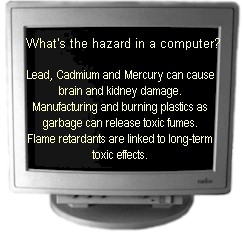
You can send a message to
manufactures and suppliers. Your purchasing decisions can affect the market.
Choose manufacturers who practice Product Stewardship by making it their
business to produce products that are less toxic, conserve materials, and
reduce waste.
This Guide can help you make
environmentally friendly choices
when you purchase computer equipment. In it you’ll find out
-
what product features can damage
the environment,
-
what alternatives to
seek,
-
where to get details about
products and contracts, and
-
who’s doing
what among
manufacturers, agencies and organizations.
Problems
and Alternatives
From design to disposal, purchasing
choices affect the environment. The lists below identify materials and
processes to consider for their environmental impacts, and show how
your purchasing specifications can reduce or eliminate those problems.
 Further on in this Guide, you’ll find web addresses and resources
for contract language, standards, and product details. Further on in this Guide, you’ll find web addresses and resources
for contract language, standards, and product details.
What’s the most important part of
"green purchasing"? It’s taking steps to avoid pollution
and waste. Energy efficient equipment cuts polluting emissions from
power plants. Providing for equipment at the
end of its useful life
also prevents pollution and save valuable resources. That’s good
business, too: the most efficient system has the least waste. If you
want to read only one part of this Guide, see "End-of-Life"
Management.
Obsolescence vs. "Upgradability"; End-of-Life
Management
What’s
the problem?
"Planned obsolescence"
and design-for-disposal uses up natural resources and causes waste.
Operating systems and software that cannot be upgraded electronically
affect both the environment and the user’s budget. Samsung announced
"the ultimate throwaway computer", sealed so it cannot be
upgraded.
What’s the alternative?
-
Lease
and take-back options (the purchaser buys computing "service"
rather than a computer "product"). Dell
and Gateway
have substantial leasing programs. Dell,
Hewlett-Packard
and some others take back certain used equipment.
-
Choose
operating systems and software that are readily upgradable
-
Ask for
readily upgradable hardware. Toshiba is developing a modular,
computer with a rewritable cartridge that can be upgraded
electronically at low cost.
-
Make sure
spare parts and service will be available (defined in "years
available after production").
-
Check to
see that memory is easily expandable.
-
Demand
"spare tire" software and licensing, pre-loaded to allow
for simple reuse of hardware. (Spare tire software is ‘inflated’
when equipment is decommissioned. The original software-related
data are erased.)
Packaging &
Shipping
What’s
the problem?
Computer equipment comes packaged in
materials that typically cannot be reused, separated, or recycled.
Glued computer parts and multiple-material packaging impede recycling.
Materials such as polystyrene are generally made without recycled
content and may be non-recyclable. Excessive packaging is wasteful.
Paper manuals and disks packaged with each computer often add to the
waste.
What’s the alternative?
-
Ask
for several computer units to be packaged together for shipping
(called "multi-paks") rather than boxed individually.
-
Require
recycled-content materials and recyclable packaging. Recyclers need
to know material types, so require labeling (type of plastic, metal,
etc.)
-
Require
manufacturers or shippers to take back packaging for reuse or
recycling. City of Seattle and Boeing computer contracts do this.
-
Ask
for on-line manuals and pre-installed programs. City of Seattle
requires this.
-
Require
that types and number of materials are minimized and content is
labeled.
Toxic Materials
What’s
the problem?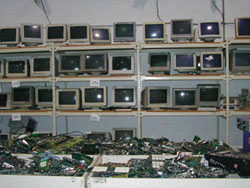 Manufacturing of computers and
component parts typically involves solvents and other substances that
must be controlled to reduce pollution and health risks. Cadmium,
mercury, lead, and brominated or halogenated compounds do not break
down readily in nature, and require special management. (Refer to the
Silicon Valley Toxics Coalition’s Clean Computer Campaign, www.svtc.org
for more details about toxic substances related to computer
equipment).
What’s the alternative?
-
Mandate
low levels of toxic chemicals of concern. Massachusetts recently
awarded points to bidders who, in manufacturing and assembly,
avoided CFCs or HCFCs, chlorinated solvents, cadmium, mercury, and
chlorinated or brominated flame retardants.
-
Use
non-halogenated flame retardants or equipment designed usingUse non-halogenated flame retardants or equipment designed using
self-extinguishing base.
-
Require
take-back provisions for all equipment.
-
Use
lead-free solder. Available from Matsushita and Sony.
-
Explore
glass-to-glass recycling to reuse leaded glass in cathode ray tubes
(CRTs). Two companies, Envirocycle
and Waste
Management Asset Recovery, have facilities to do this.
-
Use
only low-mercury and long-life lamps in flat panel displays.
Batteries
should be removable, rechargeable, and recyclable. Label
battery type, weight; give instructions for recycling, removal and
installation
Other
Design and Manufacturing Factors
What’s the problem?
Product design and manufacturing
should address air and water pollution and employee health concerns.
Besides using toxic substances and "designing-for-disposal,"
manufacturers often use glues or fasteners that make repair or upgrade
impractical. In addition, virgin and non-recyclable materials use up
more water, energy, and minerals than recycled materials.
What’s the alternative?
-
Demand
products and parts designed so they can be disassembled with universally
available tools; minimize use of fasteners. Compaq and Dell are
experimenting with snap-in, snap-out assembly.
-
Require readily
recyclable metal casings. Sony uses metal rather than plastic housings
in some products, eliminating the need for halogenated flame retardants
and increasing recyclability.
-
Require recycled-content
materials. IBM introduced a PC using 100%-recycled plastic in all
the plastic parts.
-
Use remanufactured
and refurbished equipment.
-
Choose manufacturers
who minimize the toxicity and variety of adhesives, labels, coatings,
finishes, fasteners, and metallic paints.
-
Require EnergyStar
compliance for energy use and sleep modes, active upon delivery
and functional within LAN environment. This can save substantially
on electricity use and costs, and reduce greenhouse gases related
to energy generation. City of Seattle requires Energy Star PCs.
Massachusetts required Energy Star activated upon delivery for PC’s,
printers, and video monitors http://www.energystar.gov. Researchers
at Delft University in Holland are designing a wind up laptop, that
operates for one hour upon 20 seconds of winding.
-
Require and
enable duplex printing mode
-
Require electronic
or on-line documentation. City of Seattle required no extra copies
of manuals or disks.
-
Select printers
and copiers that use remanufactured toner cartridges and can print
on both sides of paper.
-
Consider air
quality standards for printers. Environment
Canada’s standards for desktop printers: ozone concentration
must not exceed .04mg/m3; dust concentration must not exceed .24
mg/m3. http://www.environmentalchoice.com
(Env Canada's Ecolabeling Program)
-
The European
Computer Manufacturers Association (ECMA) recommends reporting the
values for ozone, VOC, and dust in terms of mg/m and/or mg/hour
determined in full operation of the product; and has set up a Task
Group to draft a standard.
Downloadable Brochure PDF
176KB
Updated 08/15/2001
|
|


